WordPress offers different content types to help you organize information on your website. The two most commonly used types are posts and pages. While they may look similar when creating them in the WordPress editor, they serve very different purposes in how your website is structured and how content is displayed to visitors. This article will guide you on “WordPress Posts vs Pages: What’s the Difference and When to Use Each.”
For beginners, it’s common to feel confused about when to use a post and when to create a page. Both allow you to add text, images, videos, and other media, and both can appear in your website navigation. However, the way they are organized, categorized, and presented within WordPress is not the same.
Choosing the right content type is important because it affects how users navigate your site, how your content is organized, and even how search engines understand your website structure. Posts are typically used for blog articles and time-based content, while pages are meant for more permanent, static information, such as your About or Contact page.
In simple terms, WordPress posts are designed for regularly updated blog content, while pages are used for static, timeless content that forms the core structure of your website. Understanding this difference will help you build a cleaner website structure and improve your overall site management.
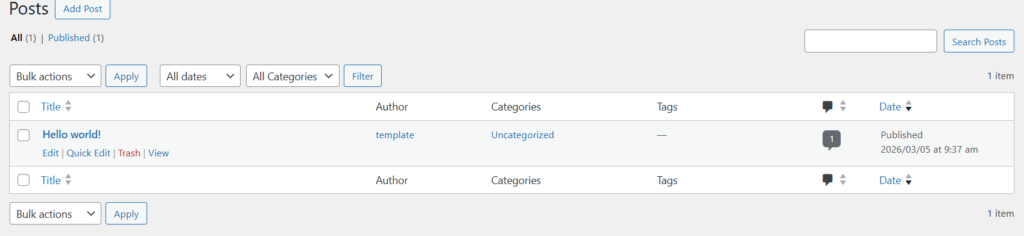
What Are WordPress Posts?
Definition of WordPress Posts
In WordPress, posts are pieces of content that are published in a chronological order, typically used for blogs, news updates, or regularly updated content. Each post usually includes a title, body content, author, publication date, and categories or tags that help organize and display the content.
WordPress posts are time-based, meaning the newest posts appear first by default. This structure makes them ideal for content that is updated frequently, such as blog articles, announcements, tutorials, or news stories. As new posts are published, older ones automatically move down the list but remain accessible through archives, categories, or tags.
Posts are designed primarily for dynamic content, especially on blog-style websites where readers expect a continuous stream of updates. They can also support features like comments, social sharing, RSS feeds, and categorization, making them highly suitable for engaging audiences and keeping content organized.
Key Features of WordPress Pages
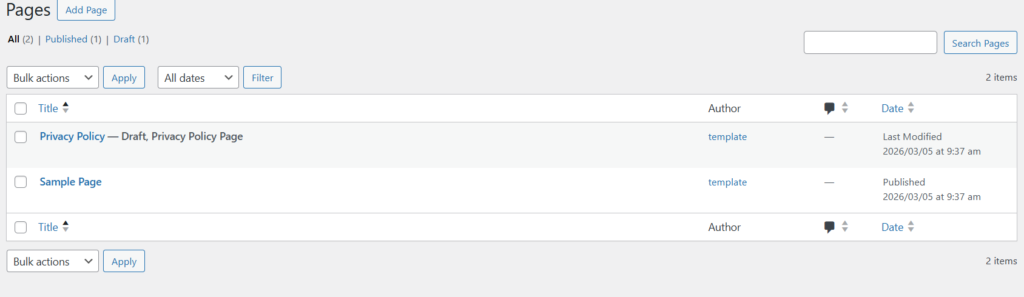
WordPress Pages are designed for static, timeless content that does not need to be updated or displayed in chronological order. Unlike posts, pages focus on delivering important information that remains relevant over long periods.
- No publish date emphasis: Pages typically do not highlight a publication date because the content is meant to stay consistent rather than reflect time-based updates.
- No categories or tags: Pages are not organized using categories or tags, which are primarily used for blog posts.
- Hierarchical structure: Pages can be arranged in a parent–child hierarchy, allowing you to create structured navigation. For example, a main page like Services can have subpages for individual services.
Typically excluded from blog feeds: Pages do not appear in blog archives or RSS feeds, keeping them separate from regularly updated content.
- Mastering Social Media Marketing and Management
- How to Learn Digital Skills Online Without Money (Beginner Guide)
- Best Digital Skills to Learn in 2026 as a Student (Beginner Guide)
- Beginner’s Guide to Learning Web Design Step by Step
Common Examples of WordPress Pages
Pages are commonly used for essential website information that visitors expect to find easily. Typical examples include:
- About Us – Information about the company, organization, or individual behind the website.
- Contact – A page containing contact details, forms, maps, or support information.
- Services – A detailed overview of the services or solutions offered.
- Privacy Policy – Legal information explaining how user data is collected and used.
Landing Pages – Specialized pages created for marketing campaigns, promotions, or lead generation.
Main Difference Between WordPress Posts and Pages
Quick Comparison Table
| Feature | WordPress Posts | WordPress Pages |
| Purpose | Used for blog articles, news updates, and regularly published content | Used for static, evergreen website content |
| Time-Based | Yes – displayed in chronological order (newest first) | No – not organized by date |
| Categories & Tags | Supports categories and tags for organization | Does not use categories or tags |
| Hierarchy | Generally standalone (not hierarchical) | Supports parent and child page structure |
| Blog Feed | Included in blog feeds and RSS feeds | Typically excluded from blog feeds |
| Comments | Often enabled for discussion | Usually disabled or optional |
| Best Use Cases | Blog posts, news articles, updates, tutorials | About page, Contact page, Services, Privacy Policy |
When to Use Posts vs Pages
Choosing between posts and pages depends on the type of content you want to publish and how you want it organized on your website.
When to Use WordPress Posts
Posts are best for regularly updated or time-sensitive content. They work well for websites that publish information frequently and want content organized by date, category, or topic.
Situational examples include:
- Blog articles about industry trends or personal experiences
- News updates or company announcements
- Tutorials and how-to guides published regularly
- Opinion pieces or editorial content
- Content that benefits from categories, tags, and comments
Posts also appear in blog pages, archives, and RSS feeds, making them ideal for sites that focus on continuous content publishing.
When to Use WordPress Pages
Pages are ideal for permanent, informational content that doesn’t change often and does not need to appear in chronological order.
Situational examples include:
- About Us pages describing a company or website
- Contact pages with forms and contact details
- Service or product information pages
- Privacy Policy or Terms of Service pages
- Landing pages for marketing campaigns
In short, use posts for dynamic, blog-style content and pages for static website information that helps visitors understand your business or navigate your site.
SEO Differences Between WordPress Posts and Pages
How Posts Help With SEO
WordPress posts can play a significant role in improving a website’s search engine visibility because they support regular content publishing and topic organization. Search engines often favor websites that frequently publish useful and relevant content.
Regular publishing improves freshness
Publishing blog posts consistently signals to search engines that your website is active and regularly updated. Fresh content can encourage search engines to crawl your site more often, which may help new pages get indexed faster and improve visibility for current topics.
Category archives create topical relevance
Posts can be organized into categories, which create archive pages grouping related articles together. These archives help search engines understand the main topics your website covers, strengthening your site’s topical authority around those subjects.
Internal linking opportunities
Blog posts naturally create opportunities for internal linking. When posts link to related articles, service pages, or cornerstone content, it helps search engines better understand your site’s structure and distributes SEO value across multiple pages. Internal links also improve user navigation and keep visitors on your site longer.
Web Agency
- WordPress Web Designing
- Digital Marketing
- Graphic Design
- Search Engine Optimization (SEO)
- Brand Registration
- Web Design Training
Our Services
SEO Benefits of Pages
WordPress pages are essential for targeting your website’s core keywords and building a strong SEO foundation. Since pages usually contain important, long-term information, they often become some of the most valuable pages for ranking in search engines.
Target core keywords
Pages are ideal for targeting primary keywords that represent your main services, products, or brand topics. For example, a business might create pages targeting keywords like web design services, digital marketing, or SEO consulting.
Pillar content
Pages often serve as pillar content, providing comprehensive information on a major topic. These pages can link to multiple related blog posts, helping search engines understand the relationship between broad topics and more specific subtopics. Stable evergreen pages
Unlike posts that may focus on time-sensitive updates, pages usually contain evergreen content that remains relevant for a long time. Because they rarely change, these pages can steadily build authority and accumulate backlinks over time.
How to Structure Posts and Pages for Better SEO
Using posts and pages strategically can significantly improve your website’s SEO structure and content organization.
Use pages for core site structure
Pages should form the foundation of your website. Important pages such as Home, Services, About, and Contact define your site’s structure and target your main keywords. These pages act as the central hubs that guide visitors and search engines through your site.
Use posts for topical clusters
Blog posts work well for building topical clusters around your main subjects. Each post can focus on a specific subtopic and link back to a relevant pillar page. This strategy helps search engines see your site as an authority on the topic while improving internal linking and content depth.
- How to Write Your First WordPress Blog Post (Step-by-Step Beginner Guide)
- How to Get a Free Domain Name (Legitimate & Safe Methods for 2026)
- Best Free Website Builders for Beginners (2026 Ultimate Guide).
- How to install Rank Math SEO Plugin & Setup
Common Mistakes Beginners Make
Publishing Blog Content as Pages
A common mistake beginners make is publishing blog-style content as pages instead of posts. Blog articles, tutorials, updates, and news should usually be published as posts because they are designed for chronological content and can be organized with categories and tags. When blog content is published as pages, it becomes harder to organize, archive, and display in blog feeds, which can negatively affect both user experience and SEO.
Not Using Categories and Tags Properly
Another frequent issue is ignoring or misusing categories and tags. Categories help group posts into broad topics, while tags provide more specific labels related to the content. Beginners sometimes create too many categories, duplicate tags, or fail to use them at all. This can lead to messy site organization and weak topical structure, making it harder for search engines and visitors to navigate the content.
Creating Too Many Pages Instead of Posts
Some website owners create too many pages for content that should be posts. Pages should generally be reserved for static content such as About, Contact, and Services pages. Using pages for every piece of content can make your site’s structure confusing and limit the benefits of blog features like archives, categories, and RSS feeds.
Poor Site Structure
A poorly planned site structure is another common beginner mistake. Without a clear hierarchy of pages and well-organized posts, visitors may struggle to find information. Search engines also rely on site structure to understand how content is related. Creating a logical structure using pages for main sections and posts for ongoing content helps improve both usability and SEO.
People Also Ask (PAA)
What is the difference between a post and a page in WordPress?
The main difference is that WordPress posts are time-based content used for blogs, while WordPress pages are static content used for permanent website information. Posts appear in chronological order and support categories and tags, whereas pages are typically used for content like About, Contact, or Services and are not organized by date.
Should I use posts or pages for SEO?
Both posts and pages play important roles in SEO. Pages are best for targeting core keywords and important website sections, such as services or product pages. Posts are ideal for publishing regular content, building topical authority, and targeting long-tail keywords through blog articles. Using both strategically creates a stronger overall SEO structure.
Can WordPress pages have categories?
By default, WordPress pages do not support categories or tags. These features are designed specifically for posts. However, it is possible to add categories to pages by using plugins or custom code, which allows pages to be organized similarly to posts if needed.
Are WordPress posts better for blogging?
Yes. WordPress posts are specifically designed for blogging because they are organized by date, support categories and tags, appear in blog feeds, and allow comments. These features make posts ideal for publishing regular articles, updates, and news content.
Can you turn a post into a page in WordPress?
Yes, you can convert a post into a page. This can be done by copying the content into a new page or by using a WordPress plugin that converts posts to pages automatically. The process keeps the content but changes how it is structured and displayed on the website.
Best Practices for Using Posts and Pages in WordPress
Build a Clear Website Structure
A well-organized website structure helps both visitors and search engines understand your content. Start by planning the main sections of your site and how users will navigate between them. Typically, your navigation menu should link to key pages such as Home, About, Services, and Contact. From these pages, visitors can easily access related blog posts or additional information.
Use Pages for Core Content
Pages should be used for your website’s most important and permanent content. These are the pages that define your business, explain what you offer, and provide essential information to visitors. Examples include service pages, product pages, company information, legal pages, and landing pages. Because these pages are foundational, they should be clearly structured and optimized for your primary keywords.
Use Posts for Regular Content
Posts are best suited for content that is published regularly, such as blog articles, updates, news, guides, and tutorials. This type of content benefits from chronological organization and the ability to be grouped by categories and tags. Regular posting also helps keep your website active and provides more opportunities to target additional search keywords.
Organize Posts With Categories
Categories help you group related posts under broader topics, making it easier for visitors to explore your content. For example, a digital marketing blog might use categories such as SEO, Content Marketing, Social Media, and PPC. A clear category structure improves user navigation and helps search engines understand the main themes of your website.
Understanding the difference between WordPress posts and pages is essential for building a well-structured website. In simple terms, posts are designed for regularly updated, time-based content such as blog articles and news updates, while pages are meant for static, long-term content like About, Services, or Contact pages.
Using both strategically can significantly improve your website’s organization, user experience, and SEO performance. Pages should form the core structure of your website, presenting essential information and targeting your main keywords. Posts, on the other hand, allow you to publish ongoing content that keeps your site active and expands your coverage of related topics.
A strong approach is to treat pages as pillar content and posts as supporting articles. Your pages introduce the main topics, while blog posts explore specific subtopics and link back to those pillars. This structure helps search engines understand your content hierarchy and makes it easier for visitors to navigate and find valuable information.
Table of Contents
Pages
Posts
- How to Turn a Smartphone Into a Full-Time Income Machine: Step-by-Step Guide.
- Essential WordPress Security Tips to Protect Your Website Effectively
- How to build your first website using Elementskit for free
- WordPress Posts vs Pages: What’s the Difference and When to Use Each
- How to Write Your First WordPress Blog Post (Step-by-Step Beginner Guide)