


If you’re building a website with WordPress, one of the first and most important things you need to learn is how to create pages and menu in WordPress. Pages and menus help organize your content, improve user experience, and make your website easy to navigate. In this guide, we will focus on how to create pages and menu in WordPress.
Whether you’re creating a blog, business website, or portfolio, this beginner-friendly guide will walk you through everything step by step, no coding required.
Watching the Video Tutorial
Prefer watching instead of reading?
I’ve created a step-by-step YouTube video tutorial that visually explains how to create pages and menu in WordPress, perfect for beginners.
What Are Pages in WordPress?
Pages in WordPress are used for static content that doesn’t change often. Common examples include:
- Home
- About Us
- Contact
- Services
- Privacy Policy
Unlike blog posts, pages are not displayed by date.
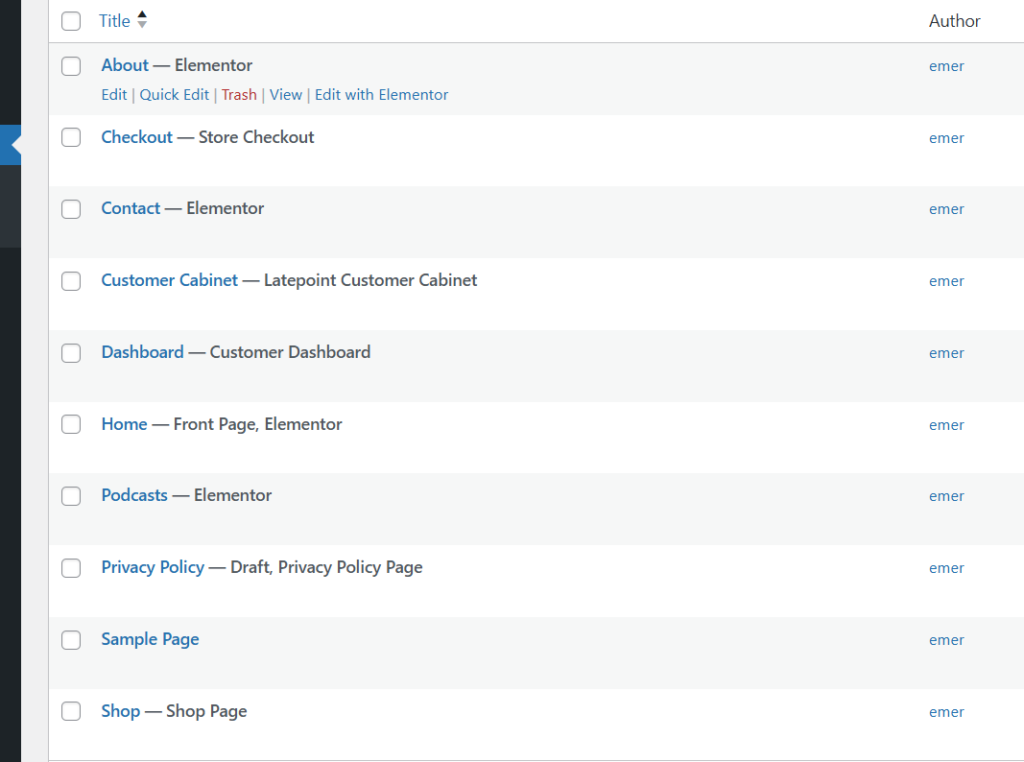
Getting Started With the WordPress Dashboard
How to Create Pages on Your WordPress Website
Step 1: Log in to Your WordPress Dashboard
Go to:
yourwebsite.com/wp-admin
Enter your username and password.
Step 2: Navigate to Pages
- Click Pages → Add New
- You’ll be taken to the WordPress page editor
Step 3: Add Page Title and Content
- Enter your page title (e.g., About Us)
- Add text, images, or videos
- Use headings (H2, H3) for better SEO
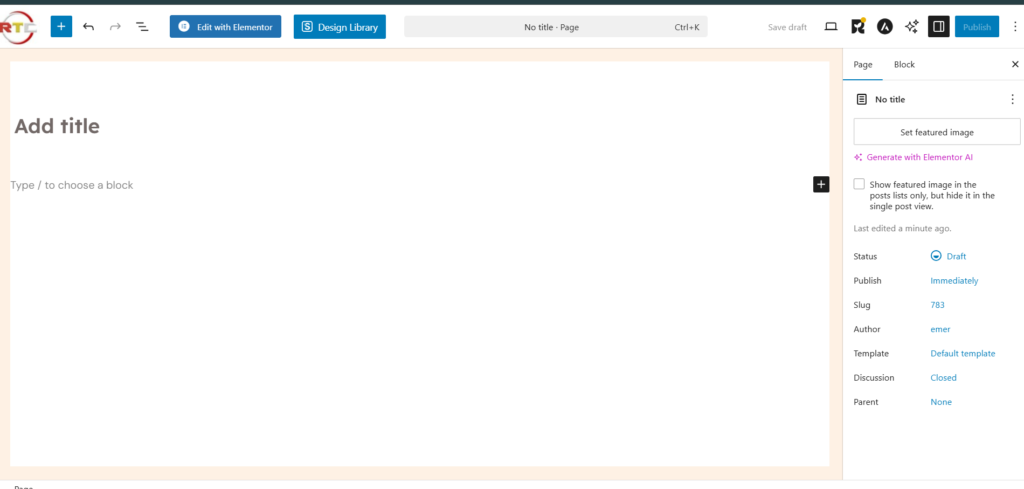
Step 4: Publish the Page
- Click Publish
- Confirm by clicking Publish again
Repeat these steps to create all important pages.
Important Pages Every WordPress Website Should Have
For SEO, trust, and AdSense approval, make sure you create:
- Home
- About
- Contact
- Blog
- Privacy Policy
What Is a Menu in WordPress?
A WordPress menu is the navigation bar that helps visitors move around your website easily. Menus usually appear:
- At the top (header menu)
- In the footer
- On the sidebar
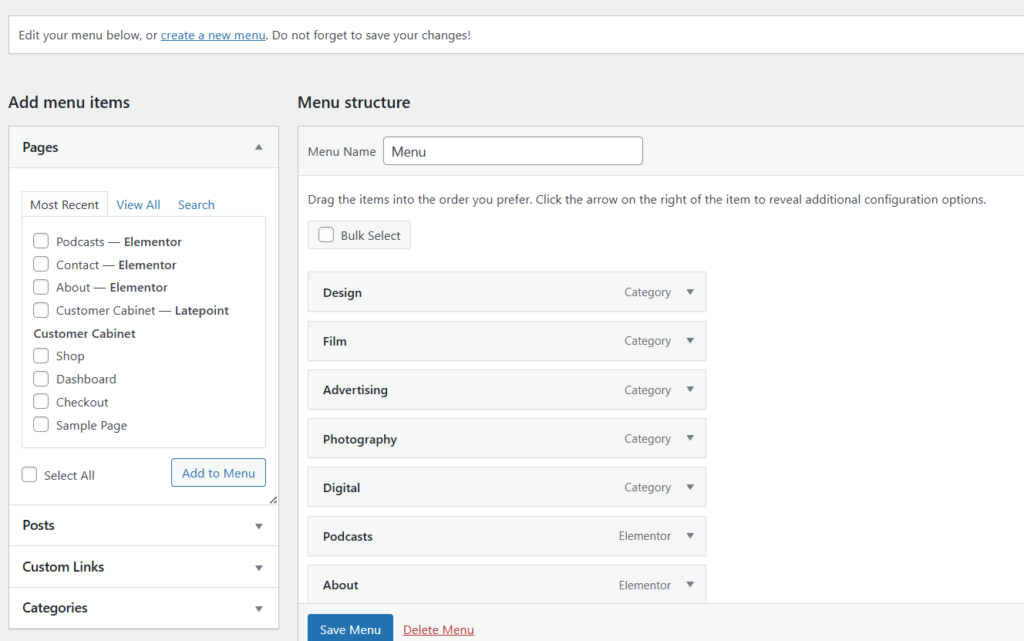
How to Create a Menu on Your WordPress Website
Step 1: Go to Menus
- From the dashboard, click Appearance → Menus
Step 2: Create a New Menu
- Click Create a new menu
- Enter a menu name (e.g., Main Menu)
- Click Create Menu
Step 3: Add Pages to the Menu
- Select the pages you created
- Click Add to Menu
- Arrange pages by dragging and dropping
Step 4: Set Menu Location
- Choose where the menu appears (Primary, Header, Footer)
- Click Save Menu
Creating Drop-Down Menus in WordPress
To create a drop-down menu:
- Drag a page slightly to the right under another page
- It becomes a submenu item
- Save the menu
This is useful for:
- Services
- Categories
- Multi-page sections
Best Practices for WordPress Pages and Menus
✔ Keep menu items simple
✔ Use clear page names
✔ Limit menu items to 5–7
✔ Place important pages first
✔ Ensure mobile responsiveness
Common Beginner Mistakes to Avoid
❌ Creating too many pages
❌ Not adding pages to the menu
❌ Using unclear page titles
❌ Forgetting to set menu location
SEO Benefits of Proper Pages and Menus
Well-structured pages and menus:
- Improve user experience
- Reduce bounce rate
- Help search engines crawl your site
- Boost SEO rankings
- Beginner’s Guide to Learning Web Design Step by Step
- Best Digital Skills for Freelancers
- How to Learn Graphic Design Online (Tools, Skills, and Roadmap for Beginners)
- Best Web Hosting for WordPress Beginners (2025 Review)
FAQs
Can I edit pages after publishing?
Yes. You can edit pages anytime without losing content.
Can I have multiple menus in WordPress?
Yes. You can create different menus for the header, footer, and mobile.
Do menus affect SEO?
Yes. Clear navigation helps search engines understand your site structure.
Learning how to create pages and menus on your WordPress website is a foundational skill every website owner must master. With properly structured pages and a clean navigation menu, your website becomes more professional, user-friendly, and SEO-ready.
You can take time to organize your content; it pays off in traffic, trust, and growth.
Table of Contents
Quick Links
- How to Turn a Smartphone Into a Full-Time Income Machine: Step-by-Step Guide.
- Essential WordPress Security Tips to Protect Your Website Effectively
- How to build your first website using Elementskit for free
- WordPress Posts vs Pages: What’s the Difference and When to Use Each
- How to Write Your First WordPress Blog Post (Step-by-Step Beginner Guide)




[…] How to Create Pages and Menus in WordPress (Beginner Guide) […]
[…] How to Create Pages and Menus in WordPress (Beginner Guide) […]
[…] How to Create Pages and Menus in WordPress […]
[…] How to Create Pages and Menus in WordPress (Beginner Guide) […]
[…] How to Create Pages and Menus in WordPress (Beginner Guide) […]