How to Install a Theme on WordPress (Step-by-Step Guide)

How to install a theme on WordPress

One of the best things about WordPress is how easy it is to change your website’s design. Learning how to install a theme on WordPress allows you to customize your site’s appearance without coding.

In this guide, you’ll learn three simple methods to install a WordPress theme and choose the right one for your website.

Watch Instead of Reading? Video Tutorial Available

In case you prefer learning visually, we’ve created a step-by-step WordPress Dashboard video tutorial that walks you through how to install a Theme on WordPress

 What Is a WordPress Theme?

A WordPress theme controls your website’s:

  • Layout and structure
  • Colors and fonts
  • Header, footer, and sidebar design

Themes allow you to change your website’s look without affecting your content.

WordPress theme design preview for beginners

Things to Do Before Installing a Theme

Before installing a new theme:

  • Back up your website
  • Check theme compatibility with your WordPress version
  • Read reviews and ratings

Getting Started With the WordPress Dashboard (Beginner’s Guide)

Method 1 – Install Theme From WordPress Dashboard (Recommended)

Step-by-Step

  1. Log in to your WordPress dashboard
  2. Go to Appearance → Themes
  3. Click Add New
  4. Search for a theme
  5. Click Install, then Activate

This is the easiest and safest method for beginners.
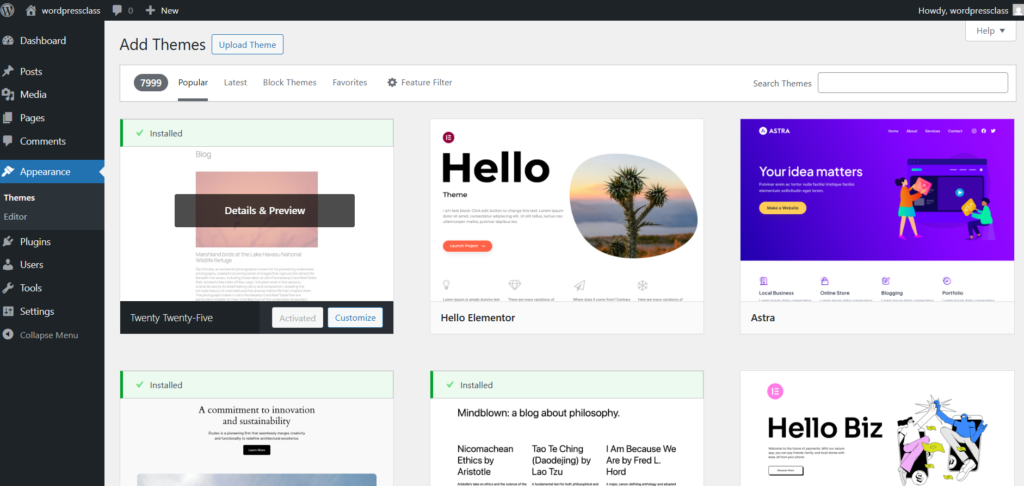
Install the WordPress theme from the dashboard.

Method 2 – Upload a WordPress Theme (.ZIP File)

This method is useful for premium or custom themes.

Steps

  1. Go to Appearance → Themes → Add New
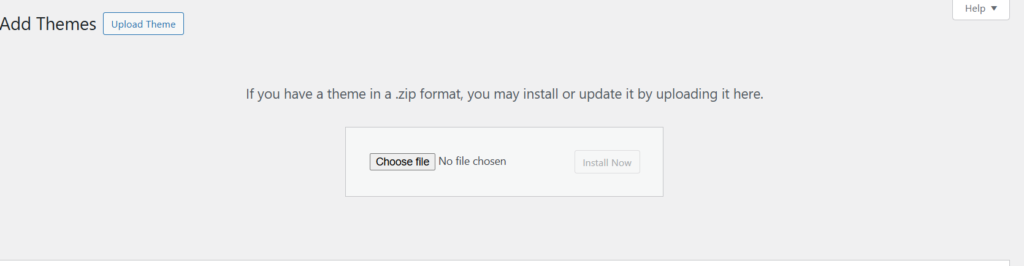
  2. Click Upload Theme
  3. Choose the theme ZIP file
  4. Click Install Now
  5. Activate the theme
Upload the WordPress theme zip file.

Method 3 – Install Theme Using FTP (Advanced Users)

This method is recommended only if other methods fail.

Steps

  1. Download and extract the theme ZIP file
  2. Connect to your website using FTP
  3. Upload the theme folder to /wp-content/themes/
  4. Go to Appearance → Themes
  5. Activate the theme
  6.  FTP is optional for beginners.

How to Customize Your WordPress Theme

After activation:

  • Go to Appearance → Customize
  • Change colors, fonts, and layout
  • Set homepage and menus

Common Mistakes to Avoid

❌ Installing too many themes
❌ Using outdated themes
❌ Ignoring mobile responsiveness
❌ Not checking plugin compatibility

Free vs Premium WordPress Themes

Free Themes
✔ Budget-friendly
✔ Good for beginners

Premium Themes
✔ Advanced features
✔ Better support
✔ Professional design

Divi Free Educational Theme

FAQs

Can I change my WordPress theme anytime?

Yes, you can change themes without losing content.

Will installing a theme affect SEO?

Yes. Fast, clean themes improve SEO performance.

How many themes can I install?

You can install multiple themes, but activate only one.

Now you know how to install a theme on WordPress using different methods. Whether you choose a free or premium theme, always prioritize speed, responsiveness, and simplicity.
A well-chosen theme sets the foundation for a successful website.

		[{"id":1874,"link":"https:\/\/emerenini.com\/how-to-create-a-custom-contact-form-using-forminator\/","name":"how-to-create-a-custom-contact-form-using-forminator","thumbnail":{"url":"https:\/\/emerenini.com\/mejosom\/uploads\/2026\/02\/pexels-brettjordan-5444631.jpg","alt":"How to Design a High-Converting Contact Page with Elementor"},"title":"How to Create a Custom Contact Form Using Forminator","postMeta":[],"author":{"name":"Emerenini Maduabuchi","link":"https:\/\/emerenini.com\/author\/maduabuchiemereninigmail-com\/"},"date":"Feb 14, 2026","dateGMT":"2026-02-14 07:42:13","modifiedDate":"2026-02-14 08:42:15","modifiedDateGMT":"2026-02-14 07:42:15","commentCount":"0","commentStatus":"open","categories":{"coma":"<a href=\"https:\/\/emerenini.com\/category\/wordperss-tutorials\/\" rel=\"category tag\">WordPress Tutorials<\/a>","space":"<a href=\"https:\/\/emerenini.com\/category\/wordperss-tutorials\/\" rel=\"category tag\">WordPress Tutorials<\/a>"},"taxonomies":{"post_tag":"<a href='https:\/\/emerenini.com\/tag\/contact-page-design\/' rel='post_tag'>contact page design<\/a><a href='https:\/\/emerenini.com\/tag\/conversion-optimization\/' rel='post_tag'>conversion optimization<\/a><a href='https:\/\/emerenini.com\/tag\/elementor-contact-page\/' rel='post_tag'>Elementor contact page<\/a><a href='https:\/\/emerenini.com\/tag\/high-converting-contact-page-2\/' rel='post_tag'>high-converting contact page<\/a><a href='https:\/\/emerenini.com\/tag\/wordpress-contact-page\/' rel='post_tag'>WordPress contact page<\/a>"},"readTime":{"min":4,"sec":19},"status":"publish","excerpt":""},{"id":1861,"link":"https:\/\/emerenini.com\/how-to-design-a-high-converting-contact-page-with-elementor-step-by-step\/","name":"how-to-design-a-high-converting-contact-page-with-elementor-step-by-step","thumbnail":{"url":"https:\/\/emerenini.com\/mejosom\/uploads\/2026\/02\/pexels-david-besh-884788.jpg","alt":"How to Design a High-Converting Contact Page with Elementor"},"title":"How to Design a High-Converting Contact Page with Elementor (Step-by-Step)","postMeta":[],"author":{"name":"Emerenini Maduabuchi","link":"https:\/\/emerenini.com\/author\/maduabuchiemereninigmail-com\/"},"date":"Feb 7, 2026","dateGMT":"2026-02-07 15:42:30","modifiedDate":"2026-02-12 18:29:34","modifiedDateGMT":"2026-02-12 17:29:34","commentCount":"0","commentStatus":"open","categories":{"coma":"<a href=\"https:\/\/emerenini.com\/category\/wordperss-tutorials\/\" rel=\"category tag\">WordPress Tutorials<\/a>","space":"<a href=\"https:\/\/emerenini.com\/category\/wordperss-tutorials\/\" rel=\"category tag\">WordPress Tutorials<\/a>"},"taxonomies":{"post_tag":"<a href='https:\/\/emerenini.com\/tag\/contact-page-design\/' rel='post_tag'>contact page design<\/a><a href='https:\/\/emerenini.com\/tag\/conversion-optimization\/' rel='post_tag'>conversion optimization<\/a><a href='https:\/\/emerenini.com\/tag\/high-converting-contact-page\/' rel='post_tag'>high-converting contact page.<\/a><a href='https:\/\/emerenini.com\/tag\/wordpress-contact-page\/' rel='post_tag'>WordPress contact page<\/a>"},"readTime":{"min":4,"sec":22},"status":"publish","excerpt":""},{"id":1829,"link":"https:\/\/emerenini.com\/how-to-design-a-website-service-page-using-wordpress\/","name":"how-to-design-a-website-service-page-using-wordpress","thumbnail":{"url":"https:\/\/emerenini.com\/mejosom\/uploads\/2026\/02\/Screenshot-2026-02-03-073650.png","alt":"Service list"},"title":"How to Design a Website Service Page Using WordPress","postMeta":[],"author":{"name":"Emerenini Maduabuchi","link":"https:\/\/emerenini.com\/author\/maduabuchiemereninigmail-com\/"},"date":"Feb 3, 2026","dateGMT":"2026-02-03 16:50:48","modifiedDate":"2026-02-04 16:27:56","modifiedDateGMT":"2026-02-04 15:27:56","commentCount":"1","commentStatus":"open","categories":{"coma":"<a href=\"https:\/\/emerenini.com\/category\/wordperss-tutorials\/\" rel=\"category tag\">WordPress Tutorials<\/a>","space":"<a href=\"https:\/\/emerenini.com\/category\/wordperss-tutorials\/\" rel=\"category tag\">WordPress Tutorials<\/a>"},"taxonomies":{"post_tag":"<a href='https:\/\/emerenini.com\/tag\/service-page-design\/' rel='post_tag'>service page design<\/a><a href='https:\/\/emerenini.com\/tag\/website-services-page\/' rel='post_tag'>Website services page<\/a><a href='https:\/\/emerenini.com\/tag\/wordpress-for-beginners\/' rel='post_tag'>WordPress for beginners<\/a><a href='https:\/\/emerenini.com\/tag\/wordpress-service-page\/' rel='post_tag'>WordPress service page<\/a><a href='https:\/\/emerenini.com\/tag\/wordpress-website-design\/' rel='post_tag'>WordPress website design<\/a>"},"readTime":{"min":4,"sec":26},"status":"publish","excerpt":""}]	

2 thoughts on “How to Install a Theme on WordPress (Step-by-Step Guide)

Leave a Reply

Your email address will not be published. Required fields are marked *